
Simulating the iSight Camera in the iOS Simulator
A well-known limitation of the iOS Simulator is that you are unable to test
code that uses the camera. Unlike some other hardware features (Location
Services, Touch ID, orientation, gestures), Apple has yet to add a way to
either link the Simulator’s camera output to a camera on the host device, or
even allow you to choose a static image to “mock” the input of the camera.
That’s the goal of this tutorial. I’ll walk you through creating an interface
around the camera and then mocking it to use on the Simulator. The result will
be that you can include some static images to represent the front and rear
cameras when running your app in the Simulator.
You can check out my example app on GitHub if you want to see
it in action. When run on your phone, it presents a simple app with a camera
preview. There’s a button to switch cameras and a button to snap a photo. When
you snap a photo it will capture the image and then present it in another view
that includes and “X” button to discard and go back to the preview view. When
run in the Simulator it behaves the same, except the front and back camera
previews will display static images that get included with the project. I’m
using Swift but I imagine you could follow a similar pattern with Objective-C.
Using AVFoundation
To start with, you need to wrap up access to the camera with a clean interface.
I found this tutorial to be extremely helpful. I
recommend you read it, but to briefly sum it up, you create a
CameraController class that handles all setup, switching front and back
cameras, and capturing a photo.
1
2
3
4
5
6
7
8
9
10
11
12
13
14
15
16
17
18
19
20
21
22
23
24
25
26
27
28
29
30
31
32
33
34
35
36
37
38
39
40
41
42
43
44
45
46
47
48
49
50
51
52
53
54
55
56
57
58
59
60
61
62
63
64
65
66
67
68
69
70
71
72
73
74
75
76
77
78
79
80
81
82
83
84
85
86
87
88
89
90
91
92
93
94
95
96
97
98
99
100
101
102
103
104
105
106
107
108
109
110
111
112
113
114
115
116
117
118
119
120
121
122
123
124
125
126
127
128
129
130
131
132
133
134
135
136
137
138
139
140
141
142
143
144
145
146
147
148
149
150
151
152
153
154
155
156
157
158
159
160
161
162
163
164
165
166
167
168
169
170
171
172
173
174
175
176
177
178
179
180
181
182
183
184
185
186
187
188
189
190
191
192
193
194
195
196
197
198
199
200
201
202
203
204
205
206
207
208
209
210
211
212
213
214
215
216
217
218
219
220
221
222
|
import AVFoundation
import UIKit

class CameraController {

 var captureSession: AVCaptureSession?
 var currentCameraPosition: CameraPosition?
 var frontCamera: AVCaptureDevice?
 var frontCameraInput: AVCaptureDeviceInput?
 var rearCamera: AVCaptureDevice?
 var rearCameraInput: AVCaptureDeviceInput?
 var photoOutput: AVCapturePhotoOutput?
 var previewLayer: AVCaptureVideoPreviewLayer?
 var photoCaptureCompletionBlock: ((UIImage?, Error?) -> Void)?

 func prepare(completionHandler: @escaping (Error?) -> Void) {
 func createCaptureSession() {
 self.captureSession = AVCaptureSession()
 }

 func configureCaptureDevices() throws {
 let session = AVCaptureDevice.DiscoverySession(
 deviceTypes: [.builtInWideAngleCamera],
 mediaType: AVMediaType.video,
 position: .unspecified)
 let cameras = (session.devices.compactMap { $0 })

 if (cameras.isEmpty) {
 throw CameraControllerError.noCamerasAvailable
 }

 for camera in cameras {
 if camera.position == .front {
 self.frontCamera = camera
 } else if (camera.position == .back) {
 self.rearCamera = camera

 try camera.lockForConfiguration()
 camera.focusMode = .continuousAutoFocus
 camera.unlockForConfiguration()
 }
 }

 func configureDeviceInputs() throws {
 guard let captureSession = self.captureSession else {
 throw CameraControllerError.captureSessionIsMissing
 }

 if let frontCamera = self.frontCamera {
 self.frontCameraInput = try AVCaptureDeviceInput(device: frontCamera)
 if captureSession.canAddInput(self.frontCameraInput!) {
 captureSession.addInput(self.frontCameraInput!)
 } else {
 throw CameraControllerError.inputsAreInvalid
 }
 self.currentCameraPosition = .front

 } else if let rearCamera = self.rearCamera {
 self.rearCameraInput = try AVCaptureDeviceInput(device: rearCamera)
 if captureSession.canAddInput(self.rearCameraInput!) {
 captureSession.addInput(self.rearCameraInput!)
 } else {
 throw CameraControllerError.inputsAreInvalid
 }
 self.currentCameraPosition = .rear

 } else {
 throw CameraControllerError.noCamerasAvailable
 }
 }

 func configurePhotoOutput() throws {
 guard let captureSession = self.captureSession else {
 throw CameraControllerError.captureSessionIsMissing
 }
 self.photoOutput = AVCapturePhotoOutput()
 self.photoOutput!.setPreparedPhotoSettingsArray([
 AVCapturePhotoSettings(format: [AVVideoCodecKey: AVVideoCodecType.jpeg])
 ], completionHandler: nil)

 if captureSession.canAddOutput(self.photoOutput!) {
 captureSession.addOutput(self.photoOutput!)
 }
 }

 func startCaptureSession() throws {
 guard let captureSession = self.captureSession else {
 throw CameraControllerError.captureSessionIsMissing
 captureSession.startRunning()
 }

 DispatchQueue(label: "prepare").async {
 do {
 createCaptureSession()
 try configureCaptureDevices()
 try configureDeviceInputs()
 try configurePhotoOutput()
 try startCaptureSession()
 } catch {
 DispatchQueue.main.async {
 completionHandler(error)
 }

 return
 }

 DispatchQueue.main.async {
 completionHandler(nil)
 }
 }

 func captureImage(completion: @escaping (UIImage?, Error?) -> Void) {
 guard let captureSession = self.captureSession,
 captureSession.isRunning else {
 completion(nil, CameraControllerError.captureSessionIsMissing)
 return
 }

 let settings = AVCapturePhotoSettings()

 self.photoCaptureCompletionBlock = completion
 self.photoOutput?.capturePhoto(with: settings, delegate: self)
 }

 func displayPreview(on view: UIView) throws {
 guard let captureSession = self.captureSession else {
 throw CameraControllerError.captureSessionIsMissing
 }

 self.previewLayer = AVCaptureVideoPreviewLayer(session: captureSession)
 self.previewLayer?.videoGravity = .resizeAspectFill
 self.previewLayer?.connection?.videoOrientation = .portrait

 view.layer.insertSublayer(self.previewLayer!, at: 0)
 self.previewLayer?.frame = view.frame
 }

 func switchCameras() throws {
 guard let currentCameraPosition = currentCameraPosition,
 let captureSession = self.captureSession,
 captureSession.isRunning else {
 throw CameraControllerError.captureSessionIsMissing
 }

 captureSession.beginConfiguration()

 func switchToFrontCamera() throws {
 let inputs = captureSession.inputs as [AVCaptureInput]
 guard let rearCameraInput = self.rearCameraInput,
 inputs.contains(rearCameraInput),
 let frontCamera = self.frontCamera else {
 throw CameraControllerError.invalidOperation
 }

 self.frontCameraInput = try AVCaptureDeviceInput(device: frontCamera)
 captureSession.removeInput(rearCameraInput)
 if captureSession.canAddInput(self.frontCameraInput!) {
 captureSession.addInput(self.frontCameraInput!)
 self.currentCameraPosition = .front
 }

 func switchToRearCamera() throws {
 let inputs = captureSession.inputs as [AVCaptureInput]
 guard let frontCameraInput = self.frontCameraInput,
 inputs.contains(frontCameraInput),
 let rearCamera = self.rearCamera else {
 throw CameraControllerError.invalidOperation
 }

 self.rearCameraInput = try AVCaptureDeviceInput(device: rearCamera)
 captureSession.removeInput(frontCameraInput)
 if captureSession.canAddInput(rearCameraInput!) {
 captureSession.addInput(rearCameraInput!)
 self.currentCameraPosition = .rear
 }

 switch currentCameraPosition {
 case .front:
 try switchToRearCamera()
 case .rear:
 try switchToFrontCamera()
 }

 captureSession.commitConfiguration()
 }

}

extension CameraController: AVCapturePhotoCaptureDelegate {

 func photoOutput(_ output: AVCapturePhotoOutput, didFinishProcessingPhoto photo: AVCapturePhoto, error: Error?) {
 if let error = error{
 self.photoCaptureCompletionBlock?(nil, error)
 } else if let data = photo.fileDataRepresentation(),
 let image = UIImage(data: data) {
 self.photoCaptureCompletionBlock?(image, nil)
 } else {
 self.photoCaptureCompletionBlock?(nil, CameraControllerError.unknown)
 }
 }

}

enum CameraControllerError: Swift.Error {

 case captureSessionAlreadyRunning
 case captureSessionIsMissing
 case inputsAreInvalid
 case invalidOperation
 case noCamerasAvailable
 case unknown

}

public enum CameraPosition {

 case front
 case rear

}
|
Make a Protocol for Accessing the Camera
I found this controller to be extremely helpful, but when running the app in
the Simulator, it throws a CameraControllerError.noCamerasAvailable and your
app has to be able to deal with not having access to a camera. If taking photos
is integral to your app, like it is mine, that won’t do. To save yourself from
needing to test in an actual device all the time, turn the CameraController
class into a protocol:
1
2
3
4
5
6
7
8
9
10
11
12
|
protocol CameraController {

 func prepare(completionHandler: @escaping (Error?) -> Void)

 func captureImage(completion: @escaping (UIImage?, Error?) -> Void)

 func displayPreview(on view: UIView) throws

 func switchCameras() throws

}
|
Rename your former CameraController class to RealCameraController:
1
2
3
4
5
6
7
8
9
10
11
12
|
class RealCameraController: NSObject, CameraController {

 // ...

}

extension RealCameraController: AVCapturePhotoCaptureDelegate {

 // ...

}
|
Making a Fake Implementation of the Camera Controller
Now that you have that done, you can fake out the protocol using some static
images to simulate the from and back cameras. Add two photos to your
Assets.xcassets and call them “Front Camera” and “Back Camera.” Note that you
probably want the dimensions of these images to match whatever dimensions you
expect the camera to produce.
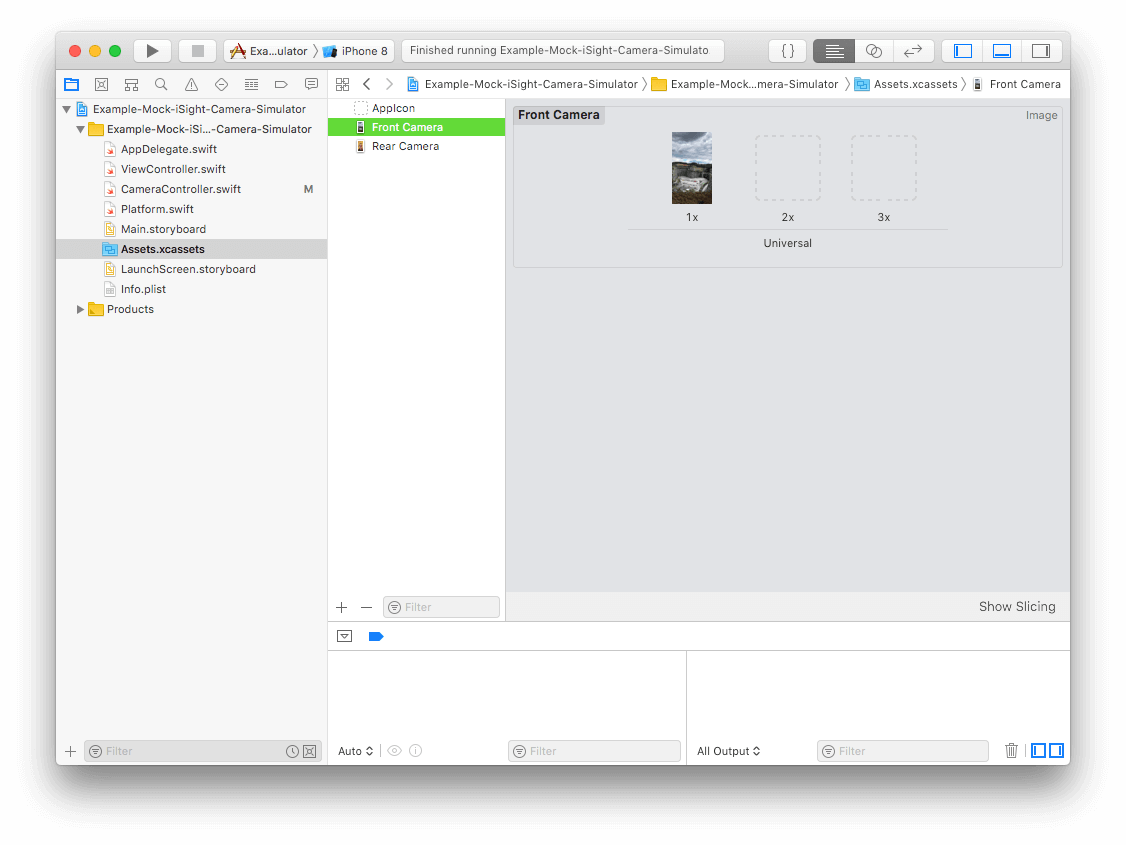
Implement a MockCameraController that conforms to the CameraController
protocol, making it use those two images in lieu of the actual camera.
1
2
3
4
5
6
7
8
9
10
11
12
13
14
15
16
17
18
19
20
21
22
23
24
25
26
27
28
29
30
31
32
33
34
35
36
37
38
39
40
41
|
class MockCameraController: NSObject, CameraController {

 var frontImage = UIImage(named: "Front Camera")!
 var rearImage = UIImage(named: "Rear Camera")!
 var cameraPosition = CameraPosition.rear
 var previewLayer = CALayer()

 func prepare(completionHandler: @escaping (Error?) -> Void) {
 setPreviewFrame(image: self.rearImage)
 completionHandler(nil)
 }

 func captureImage(completion: @escaping (UIImage?, Error?) -> Void) {
 if self.cameraPosition == CameraPosition.rear {
 completion(self.rearImage, nil)
 } else {
 completion(self.frontImage, nil)
 }
 }

 func displayPreview(on view: UIView) throws {
 self.previewLayer.frame = view.bounds
 view.layer.insertSublayer(self.previewLayer, at: 0)
 }

 func switchCameras() throws {
 if self.cameraPosition == CameraPosition.rear {
 self.cameraPosition = CameraPosition.front
 setPreviewFrame(image: self.frontImage)
 } else {
 self.cameraPosition = CameraPosition.rear
 setPreviewFrame(image: self.rearImage)
 }
 }

 private func setPreviewFrame(image: UIImage) {
 self.previewLayer.contents = image.cgImage!
 }

}
|
What this MockCameraController does is pretty simple:
-
Keeps track of which camera is selected (front or back)
-
Provides the selected camera’s stand-in image when you call
captureImage
Creates a CALayer, inserts it into the preview view’s layer, and then
draws the appropriate image onto it whenever you switch cameras.
Tying it all Together
The last thing we need is to be able tell when to use the
RealCameraController and when to use the MockCameraController. Create a
Platform struct to encapsulate this logic:
1
2
3
4
5
6
7
8
9
10
|
import Foundation

struct Platform {

 static var isSimulator: Bool {
 return TARGET_OS_SIMULATOR != 0
 }

}
|
To use this in a view controller check to see if isSimulator is true and use
the appropriate implementation of CameraController:
1
2
3
4
5
6
7
8
9
10
11
12
13
14
15
16
17
18
19
20
21
22
23
24
25
26
27
28
29
30
31
32
33
34
35
36
37
38
39
40
41
42
43
44
45
46
47
48
49
50
51
52
|
class ViewController: UIViewController {

 let cameraController: CameraController = Platform.isSimulator ? MockCameraController() : RealCameraController()

 @IBOutlet weak var previewView: UIView!
 @IBOutlet weak var previewCanvas: UIView!
 @IBOutlet weak var captureView: UIView!
 @IBOutlet weak var captureImage: UIImageView!

 @IBAction func discardCapture(_ sender: Any) {
 self.captureImage.image = nil
 self.captureView.isHidden = true
 self.previewView.isHidden = false
 }

 @IBAction func snapPhoto(_ sender: Any) {
 self.cameraController.captureImage() { image, error in
 guard let image = image else {
 debugPrint("Couldn't capture image: (error!)")
 return
 }
 self.captureImage.image = image
 self.captureView.isHidden = false
 self.previewView.isHidden = true
 }
 }

 @IBAction func switchCameras(_ sender: Any) {
 do {
 try self.cameraController.switchCameras()
 } catch {
 debugPrint("Failed to switch cameras: (error)")
 }
 }

 override func viewDidLoad() {
 super.viewDidLoad()

 self.cameraController.prepare {(error) in
 if let error = error {
 debugPrint("Failed to start CameraController: (error)")
 }

 do {
 try self.cameraController.displayPreview(on: self.previewCanvas)
 } catch {
 debugPrint("Couldn't preview camera: (error)")
 }
 }

}
|
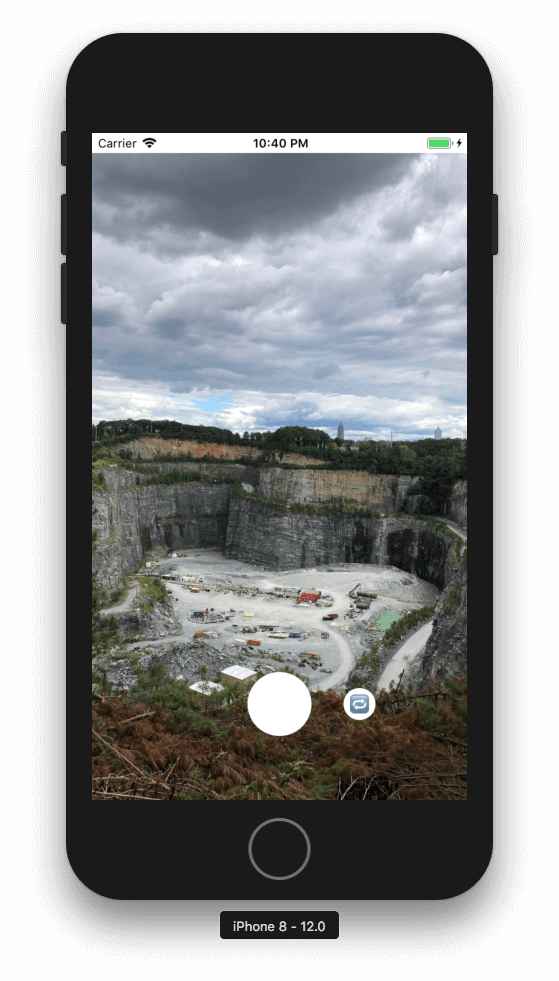
If you did everything right, you should be able to run your app in the
Simulator and in your camera UI, you’ll see the mock photo. If you
captureImage, your callback should be called with a UIImage, just like it
would on a real device.
If you found this helpful or have feedback, leave a comment or get in touch
with me on Twitter. Thanks for reading!





近期评论