
    @IBAction func button(_ sender: UIButton) {
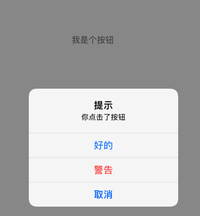
        let ac = UIAlertController(title: "提示", message: "你点击了按钮", preferredStyle: .alert)
        let btn = UIAlertAction(title: "好的", style: UIAlertAction.Style.default, handler: nil)
        let btn2 = UIAlertAction(title: "取消", style: .cancel, handler: nil)
        ac.addAction(btn)
        ac.addAction(btn2)
        let btn3 = UIAlertAction(title: "警告", style: .destructive, handler: nil)
        ac.addAction(btn3)
        self.present(ac, animated: true, completion: nil)
    }
1.iOS UIAlertActionStyle有哪些样式?
共有3种样式:
UIAlertAction.Style.default =0 // 默认样式
UIAlertAction.Style.cancel // 取消样式
UIAlertAction.Style.destructive // 点击按钮为红色
提示:设置两个cancel会崩溃!




近期评论