
MVVM(Model View ViewMode) 패턴에서 XAML View가 WPF Command를 어떻게 바인딩하는지 살펴보자. ICommand Interface로 이벤트 핸들러를 구현하여 직접 xaml에서 사용하는 예제이다. 아래의 코드처럼 화면을 구현한다고 가정한다.
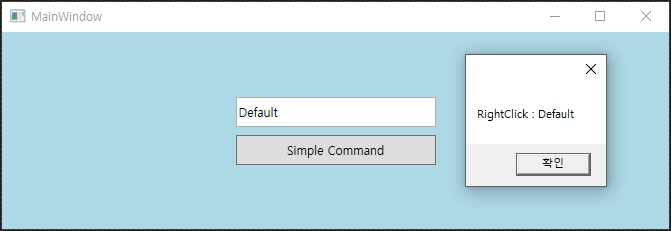
<TextBox x:Name="TextBoxSimple" Text="Default"/>
<Button x:Name="ButtonSimple" Content="Simple Command"/>
MainWindow.xaml 전체 소스
<Window x:Class="WPFDemo.MainWindow"
        xmlns="http://schemas.microsoft.com/winfx/2006/xaml/presentation"
        xmlns:x="http://schemas.microsoft.com/winfx/2006/xaml"
        xmlns:d="http://schemas.microsoft.com/expression/blend/2008"
        xmlns:mc="http://schemas.openxmlformats.org/markup-compatibility/2006"
        xmlns:local="clr-namespace:WPFDemo"
        mc:Ignorable="d"
        xmlns:vm="clr-namespace:WPFDemo.ViewModels"
        Title="MainWindow" Height="600" Width="900" FontFamily="Malgun Gothic" FontSize="12">

    <Window.Resources>
        <vm:MainViewModel x:Key="viewModel" />
    </Window.Resources>

    <Grid>
        <StackPanel VerticalAlignment="Center" HorizontalAlignment="Center">
            <TextBox x:Name="TextBoxSimple" Text="Default" Margin="4" Height="30" Width="200"
                     VerticalContentAlignment="Center" />
            <Button x:Name="ButtonSimple" Content="Simple Command" Margin="4" Height="30" Width="200">
                <Button.InputBindings>
                    <MouseBinding Gesture="LeftClick"
                                  Command="{Binding HelloLeft, Source={StaticResource viewModel}}"
                                  CommandParameter= "{Binding ElementName=TextBoxSimple, Path=Text}" />
                    <MouseBinding Gesture="RightClick"
                                  Command="{Binding HelloRight, Source={StaticResource viewModel}}"
                                  CommandParameter= "{Binding ElementName=TextBoxSimple, Path=Text}" />
                </Button.InputBindings>
            </Button>
        </StackPanel>
    </Grid>
</Window>
MainWindow.cs
using System.Windows;

namespace WPFDemo
{
    public partial class MainWindow : Window
    {
        public MainWindow()
        {
            InitializeComponent();
        }
    }
}
MainViewModel.cs
using System.Windows;
using System.Windows.Input;
using WPFDemo.ViewModels.Commands;

namespace WPFDemo.ViewModels
{
    public class MainViewModel
    {
        public ICommand HelloLeft
        {
            get
            {
                return new CommandHandler(param => HelloWorldLeft(param), HelloWorld());
            }
        }

        public ICommand HelloRight
        {
            get
            {
                return new CommandHandler(param => HelloWorldRight(param), true);
            }
        }

        public void HelloWorldLeft(object param)
        {
            MessageBox.Show("LeftClick : " + param);
        }

        public bool HelloWorld()
        {
            return true;
        }

        public void HelloWorldRight(object param)
        {
            MessageBox.Show("RightClick : " + param);
        }
    }
}
CommandHandler.cs
using System;
using System.Windows.Input;

namespace WPFDemo.ViewModels.Commands
{
    public class CommandHandler : ICommand
    {
        private readonly Action<object> mAction;
        private readonly bool mCanExecute;

        public CommandHandler(Action<object> action, bool canExecute)
        {
            mAction = action;
            mCanExecute = canExecute;
        }

        public bool CanExecute(object parameter)
        {
            return mCanExecute;
        }

        public event EventHandler CanExecuteChanged
        {
            add { CommandManager.RequerySuggested += value; }
            remove { CommandManager.RequerySuggested -= value; }
        }

        public void Execute(object parameter)
        {
            mAction(parameter);
        }
    }
}




近期评论